Battlefield 6 Secure Boot Requirement: What EA Says and What to Check
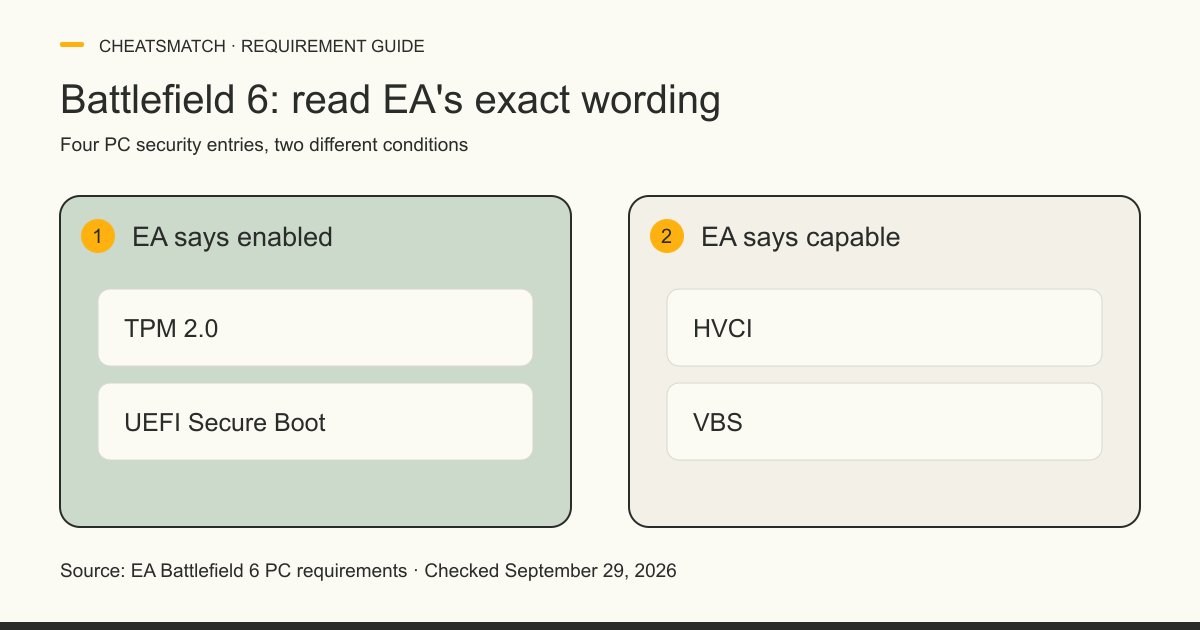
Battlefield 6 requires Secure Boot on PC, according to EA. As checked September 29, 2026, EA's PC requirements also list TPM 2.0 enabled, while HVCI and VBS are described as capable. Those words matter: the published list does not say all four features must be switched on. If the game reports a Secure Boot problem, first read the current Windows state, then use EA and your device maker's guidance for any changes.
Battlefield 6 requires Secure Boot on PC
EA states that Secure Boot is required to play Battlefield 6 on PC. Its August 2025 notice says attempting to access the game without Secure Boot enabled produces a prompt. The current PC requirements page repeats “UEFI SECURE BOOT Enabled” in both its minimum and recommended configurations. This is a game requirement, not merely a suggested Windows security setting.
The requirement is for the PC version. EA's published PC page is the right place to check whether its wording changes; older beta posts or instructions for another game may describe a different state. If you are looking at the game itself rather than the security requirement, the Battlefield 6 game comparison gives the covered listings and their documented claims. A listing is not evidence that a particular PC meets EA's requirement.
EA's four PC security requirements
EA's minimum and recommended Battlefield 6 PC specifications, checked September 29, 2026, use the same four security entries. Two say enabled and two say capable. Those are different published conditions. The table preserves EA's terms and does not infer a setting on your machine.
HVCI stands for Hypervisor-protected Code Integrity; VBS stands for Virtualization-based Security, according to Microsoft. EA's two “capable” entries should be read as written, without inventing a switch-on requirement. The official PC list also contains CPU, GPU, memory and storage requirements; this table addresses only its four additional security entries. The games directory has comparison pages for other covered titles, whose requirements must be checked separately.
| EA requirement | EA wording | What the wording means |
|---|---|---|
| TPM 2.0 | Enabled | EA lists TPM 2.0 as an enabled requirement. |
| UEFI Secure Boot | Enabled | EA lists UEFI Secure Boot as an enabled requirement. |
| HVCI | Capable | EA asks for capability; this line does not say HVCI must be enabled. |
| VBS | Capable | EA asks for capability; this line does not say VBS must be enabled. |
Why EA requires Secure Boot for Battlefield 6
EA says Battlefield 6 uses Secure Boot to support anti-cheat features against cheats that try to enter during Windows startup. Its notice names boot-stage threats and says Secure Boot supports related security features such as TPM. That is EA's stated design rationale, not a measured claim that Secure Boot stops every cheat or ensures a fair match.
EA calls its anti-cheat system EA Javelin Anticheat. The Battlefield notice says Javelin is customized for the game. Secure Boot is one requirement in that design; the requirement itself does not reveal every detection method, ban rule or data practice. The EA Javelin profile puts the named system in context across EA games. For a general explanation of Windows privilege, the separate kernel-level anti-cheat guide is more appropriate than treating Battlefield 6 as a universal model.
Sources: [1]
Check Secure Boot status without changing settings
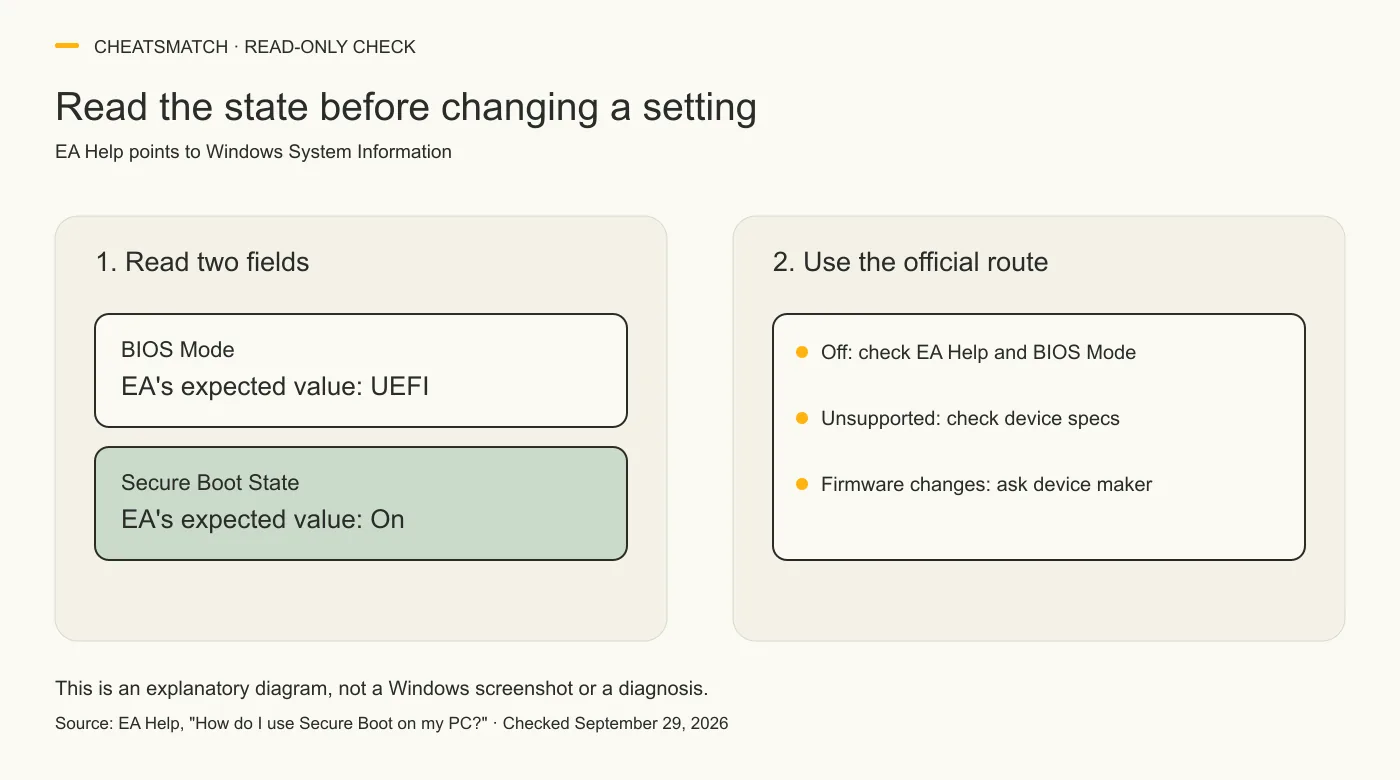
EA Help gives a read-only Windows check before any configuration work. Open Windows System Information, select System Summary, and read BIOS Mode and Secure Boot State. EA says the values should be UEFI and On, respectively. Its guide opens System Information by pressing Windows key + R and entering msinfo32. This is a status check; it does not instruct you to alter firmware or the Windows disk.
Write down the exact words you see, along with the launch message. “Off,” “Unsupported,” and a legacy BIOS mode point to different official branches; none identifies a safe one-size-fits-all setting change. If the values already read UEFI and On but Battlefield 6 still shows a prompt, this check alone does not diagnose the cause. Use EA Help and its support route with the actual message and system details rather than changing unrelated settings.
The kernel-level anti-cheat explainer covers what a privileged driver can access and why that does not by itself describe Javelin's behavior. It is background reading, not a fix for a Secure Boot prompt.
Sources: [3]
What Off or Unsupported means
EA Help treats Off and Unsupported differently. If Secure Boot State is Off, its guide directs the reader to check BIOS Mode and then the device's Secure Boot configuration. If the state is Unsupported, EA says to consult the motherboard manufacturer's specification sheet or manual to see whether Secure Boot is supported. This page cannot infer support or a safe configuration from a status word alone.
EA also says a legacy BIOS mode calls for checking whether the Windows disk uses MBR or GPT. That involves a different system setup question from reading Secure Boot State. Do not treat a launch prompt as permission to convert a disk, reset Secure Boot keys or change firmware settings from a generic article. Preserve the current state and use the correct device documentation or a qualified professional if a change is needed.
Sources: [3]
Get device-specific help before firmware changes
EA warns that its general Secure Boot guide may not match a particular PC. Firmware menus differ by manufacturer, and incorrect BIOS configuration can prevent a computer from starting. EA recommends reading the PC or motherboard maker's support resources before a BIOS update or setting change; readers unfamiliar with firmware should contact the manufacturer or a professional.
That route matters most if System Information shows Unsupported or Legacy, if an option is unavailable, or if you are unsure how a proposed change affects your Windows installation. The device maker's model-specific support and EA's current help page can address the real hardware and launch message. This article supplies the requirement and a read-only status check, not a universal firmware recipe.
Sources: [3]
Where EA Javelin fits
EA Javelin Anticheat is the named protection system in EA's Battlefield 6 Secure Boot notice. In a September 2026 update, EA says Javelin runs when a protected game runs and that its anti-cheat processes shut down after the game closes. That is EA's current public statement about its own system, not an independent process audit or a statement about every anti-cheat product.
Secure Boot is a PC startup feature, while EA describes Javelin as game-time protection. These facts can coexist: a boot-time platform requirement does not mean Javelin's own processes run indefinitely. Nor does the fact that the game starts establish that a future match is free of cheating. For the latest requirement and support directions, return to the dated EA pages cited here.
Frequently asked questions
Does Battlefield 6 require TPM 2.0?
Yes. EA's minimum and recommended Battlefield 6 PC requirements, checked September 29, 2026, both list TPM 2.0 as enabled. Its Secure Boot notice also names TPM as a related security feature. Check the current EA requirements rather than assuming another game's TPM rule applies.
Do HVCI and VBS have to be enabled?
EA's Battlefield 6 PC list, checked September 29, 2026, says HVCI capable and VBS capable. It does not say “enabled” for those two entries, while it does say “enabled” for TPM 2.0 and UEFI Secure Boot. That wording does not establish whether either feature is currently on for a particular PC.
Does Secure Boot guarantee a cheat-free match?
No such guarantee follows from EA's Battlefield 6 notice, checked September 29, 2026. EA says Secure Boot supports anti-cheat features aimed at boot-process threats. That purpose does not quantify detection or ensure any individual match is free of cheating.
Does EA Javelin run after Battlefield 6 closes?
EA's September 10, 2026 update says Javelin runs while a protected game is running and all anti-cheat processes shut down when that game closes. This is EA's description of its system, not a claim based on CheatsMatch testing.
Sources and check dates
Numbers beside a fact or score refer to the sources below. Provider descriptions are claims, not independent product tests.
- Secure Boot Information · checked 2026-09-29
- Battlefield 6 System Requirements · checked 2026-09-29
- How do I use Secure Boot on my PC? · checked 2026-09-29
- Raising the Bar: A Year of Progress for EA Javelin Anticheat · checked 2026-09-29
- Virtualization-based Security (VBS) · checked 2026-09-29