
Valorant UEFI Secure Boot Errors: Riot's Requirements and Checks
Valorant requires TPM 2.0 and UEFI Secure Boot on Windows 11, according to Riot's PC requirements checked September 29, 2026. Riot lists Windows 10 separately and does not state the same blanket pair in that section. Its VAN 9001 page points to TPM 2.0 not detected as enabled; VAN 9003 points to Secure Boot not enabled. Read the current Windows state before using Riot's device-specific support route.
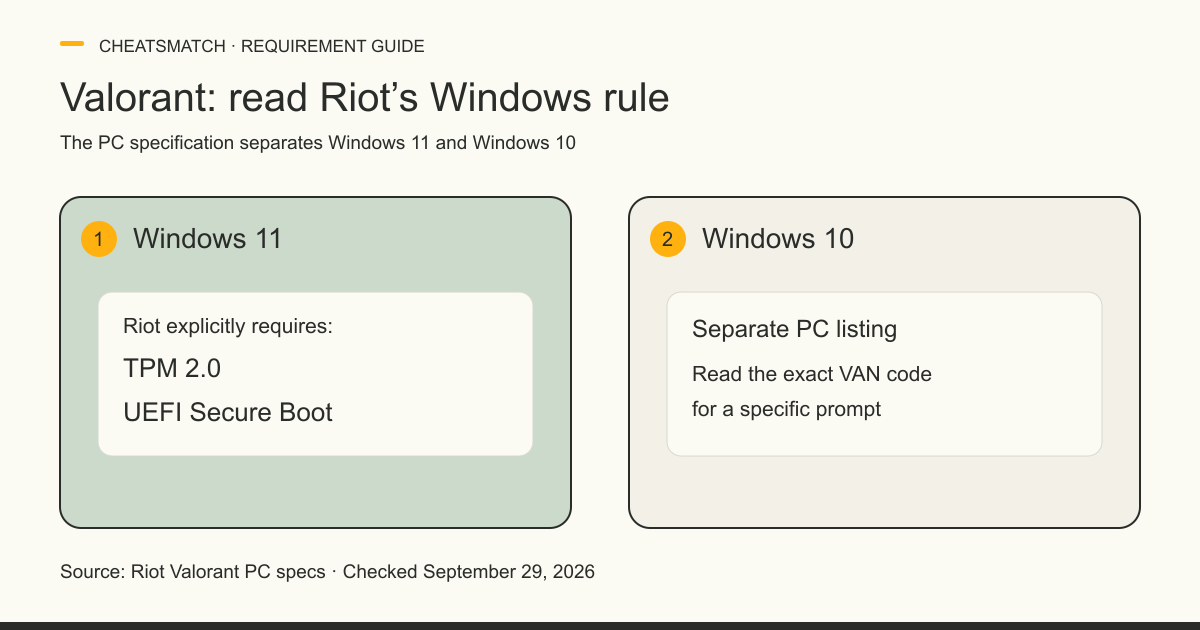
Valorant's Windows 11 Secure Boot and TPM rule
Riot's Valorant PC specifications state that Windows 11 also requires TPM 2.0 and UEFI Secure Boot. This is the clearest published baseline for the Windows 11 version of the game. Riot's support pages address separate Vanguard prompts, but a reader should start with the operating system and the exact code on screen rather than assume every launch error means the same thing.
Secure Boot is a startup security feature, not a setting invented for Valorant. Riot describes it as protection against unauthorized software during startup. TPM 2.0 is a separate security technology. Riot's Windows 11 rule names both; seeing one feature enabled does not show that the other is enabled or that Vanguard has accepted it. The Valorant game comparison covers the site's documented listings for that game. It does not test your PC or resolve a Vanguard prompt.
Windows 10 and Windows 11 are listed differently
Riot's Valorant PC page has separate Windows 10 and Windows 11 headings. Under Windows 11 it explicitly adds TPM 2.0 and UEFI Secure Boot. The Windows 10 paragraph does not state the same blanket pair. That textual distinction does not mean every Windows 10 setup will avoid a Vanguard security prompt: a dedicated VAN error page can say that a particular build currently requires a feature.
For an exact Windows 10 build eligibility question, use Riot's current PC specs or a support ticket. The games directory links the other covered game comparisons; another publisher's PC rule should not be carried into Valorant by analogy.
VAN 9001 and VAN 9003 mean different things
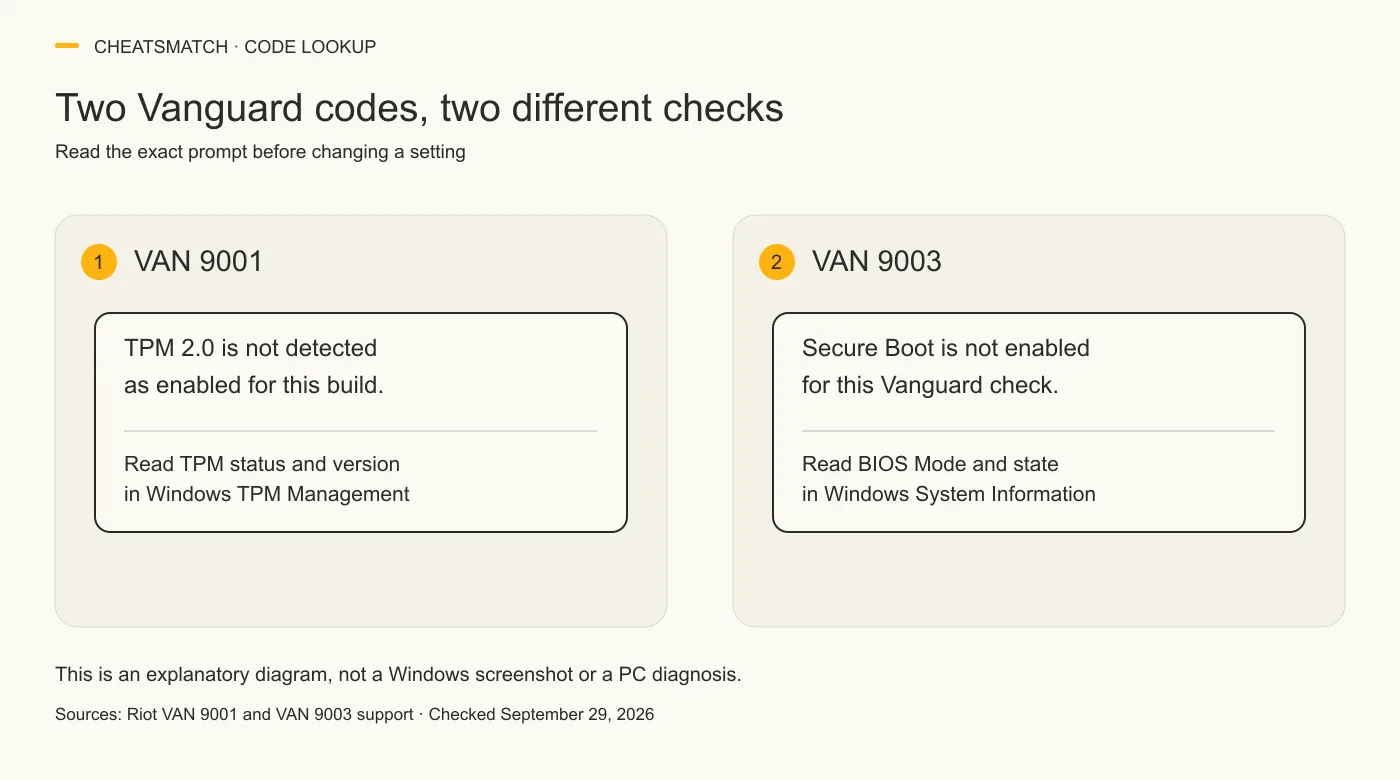
Riot's dedicated VAN 9001 and VAN 9003 pages, checked September 29, 2026, name different missing security states. The first says this Vanguard build requires TPM 2.0 but does not detect it as enabled. The second says Secure Boot is not enabled and is required by Vanguard for that error. Treat the exact code as the starting point, not as proof of a particular firmware fault.
Riot's TPM guide also distinguishes a discrete TPM that satisfies basic Vanguard checks from firmware TPM requirements in some VAN: RESTRICTION cases. That distinction should not be converted into a rule that every VAN 9001 user needs a firmware TPM. The Vanguard system profile gives background on the anti-cheat; it is separate from the two code-specific support pages.
| Code | Riot's meaning | Official route |
|---|---|---|
| VAN 9001 | This Vanguard build needs TPM 2.0, which Vanguard does not detect as enabled. | Read Riot's VAN 9001 page and TPM 2.0 status guide. |
| VAN 9003 | Vanguard reports Secure Boot is not enabled for the required check. | Read Riot's VAN 9003 page and Secure Boot status guide. |
Check Secure Boot and TPM status without changing settings
Riot's Secure Boot guide starts with a read-only System Information check. In Windows, open System Information, then read BIOS Mode and Secure Boot State. Riot says the expected values are UEFI and On. Its guide opens the tool with Windows key + R and msinfo32. This displays the current state; it does not change firmware or convert a disk.
Riot's TPM 2.0 guide similarly asks readers to open TPM Management using tpm.msc and read the status message and specification version. Its positive example is “The TPM is ready for use” with Specification Version 2.0. A missing or lower version is a different result. Record the exact text and the VAN code, rather than treating a guess about the BIOS as a diagnosis.
The kernel-level anti-cheat guide explains Windows driver privilege if you want system background. It is not a configuration guide for this Valorant prompt.
What an Off or conflicting result does and does not tell you
Riot's Secure Boot guide distinguishes the System Information results. If BIOS Mode reads UEFI and Secure Boot State reads Off, its guide directs readers to the Secure Boot section of its instructions. If BIOS Mode reads Legacy and Secure Boot is Off or Unsupported, Riot warns that a boot-mode change without the appropriate disk setup can stop Windows from starting. These are support branches, not safe universal changes that this article can prescribe for an unknown PC.
If Secure Boot State reads On but Vanguard still presents a restriction, Riot's guide directs the reader to its VAN: RESTRICTION material. Likewise, Riot's TPM guide says a “ready” TPM 2.0 result does not settle every restriction message. The displayed state and code are useful facts for a support ticket; neither proves what caused a conflicting prompt. This article does not claim that resetting keys, reinstalling Vanguard or changing a disk will resolve it.
Use Riot and device-maker guidance for changes
Riot warns that BIOS and UEFI menus differ by hardware maker and that incorrect changes can cause system problems. Its Secure Boot guide tells readers to follow the PC or motherboard manufacturer's official instructions. Riot's TPM guide likewise advises people unfamiliar with BIOS changes to contact a professional or manufacturer support. That advice is especially relevant for a Legacy or Unsupported state and for a device whose menu differs from a generic guide.
Use Riot's current page for the displayed code, then pair it with the device maker's model-specific documentation. Riot's PC specs page also offers a support ticket if the minimum specifications appear met but Valorant still will not launch. A ticket can include the Windows version, exact VAN code and read-only status values. This page does not copy firmware, Secure Boot key, disk-conversion or TPM-switch instructions because those depend on the device's configuration.
Vanguard On-Demand is a separate option
Riot's June 24, 2026 Vanguard update introduced optional on-demand driver sessions for sufficiently secured PCs under Vanguard Pre-Check. Riot says eligible users can choose a mode in which the driver starts with a Riot game and runs while they play. It repeatedly calls this option voluntary. The post describes extra security conditions for that optional mode; it does not replace the Windows 11 Valorant requirement in Riot's PC specifications.
A player should not treat every Pre-Check item as a universal condition for launching Valorant. That would conflate a preferred driver schedule with the game's published operating-system rule. Conversely, the option does not make VAN 9001 or VAN 9003 meaningless: Riot's dedicated error pages still give their code-specific meanings. Check the dated Riot support pages if either policy changes.
Frequently asked questions
Does Valorant require Secure Boot on Windows 10?
Riot's PC specs page, checked September 29, 2026, expressly adds TPM 2.0 and UEFI Secure Boot under Windows 11, not in its separate Windows 10 paragraph. That does not rule out a code-specific Vanguard requirement for a particular Windows 10 build. Use the exact error and Riot's dedicated page for that case.
What does VAN 9001 mean?
Riot's VAN 9001 page, checked September 29, 2026, says this build of Vanguard currently requires TPM 2.0, but does not detect TPM 2.0 as enabled on the PC. It directs readers to Riot's TPM 2.0 guide. The code alone does not tell a reader which hardware or firmware change is suitable.
What does VAN 9003 mean?
Riot's VAN 9003 page, checked September 29, 2026, says Secure Boot is not enabled and Vanguard requires it for the reported error. Riot directs readers to its Secure Boot guide. That is a separate meaning from VAN 9001's TPM detection issue.
Does Vanguard On-Demand change the Windows 11 requirement?
Riot's June 2026 Vanguard Pre-Check announcement calls on-demand driver operation optional for sufficiently secured PCs. Riot's Valorant PC specs separately require TPM 2.0 and UEFI Secure Boot on Windows 11. The optional mode does not erase that published base requirement.
Sources and check dates
Numbers beside a fact or score refer to the sources below. Provider descriptions are claims, not independent product tests.
- Minimum & Recommended PC Specs · checked 2026-09-29
- Error VAN 9001 · checked 2026-09-29
- Error VAN 9003 · checked 2026-09-29
- Secure Boot · checked 2026-09-29
- Enable TPM 2.0 · checked 2026-09-29
- Incoming: Vanguard On-Demand · checked 2026-09-29